Basic Get Requests
Introduction
The provided Python code demonstrates how to perform a GET request to a product page URL, extract the HTML content, and use XPath expressions to retrieve specific data points from the page. Here's a step-by-step explanation:
Problem Statement
Open single product page as given below and get below data points shown in image as well :
- Title
- Part Number
- MPN
- Unit Price (Each Quantity)
- Stock Availability (get stock info available or not)
SnapShot for data to capture :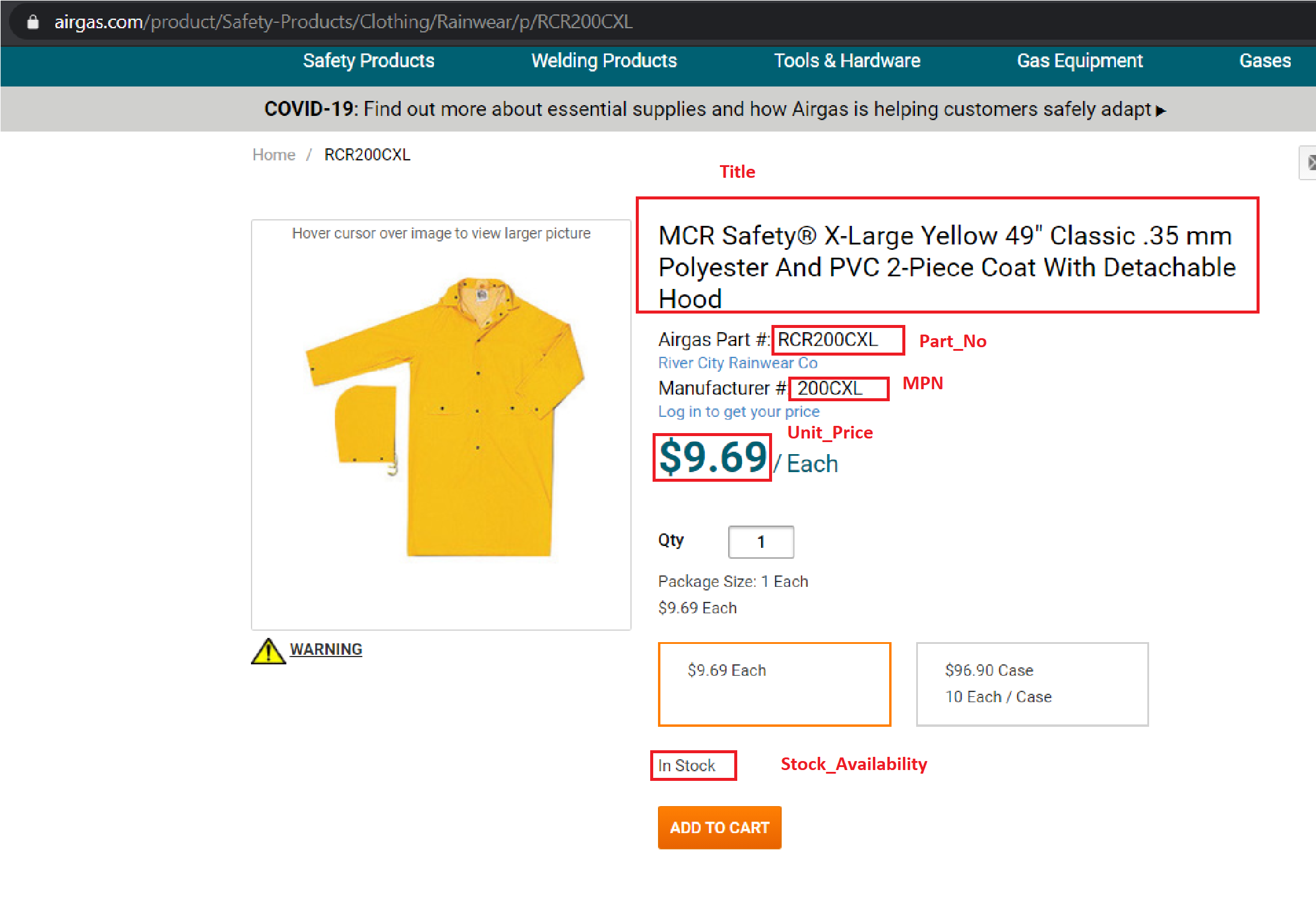
Code Snippet
import requests
from lxml.html import fromstring

url = 'https://www.airgas.com/product/Safety-Products/Clothing/Rainwear/p/RCR200CXL'
# get response
response = requests.get(url)
print(f'raw response : {response}')
Output of print statement :

# read status code from response
print(f'STATUS CODE : {response.status_code}')

# raw response type is "byte"
print(f'response content type : {type(response.content)}')

# read content or text from response
print(f'response text : {response.text}')
parser = fromstring(response.content)
# Example of xpath to get data points on pages

# Title of page
Title = parser.findtext('.//title')
Title = str(Title.replace("\n", " ").replace("\t", " ")).strip()
print("Title : ", Title)

# Part No - SKU
Part_No = parser.xpath('.//p[@class="airgas-part-number"]/em/text()')[0]
Part_No = str(Part_No.replace("\n", " ").replace("\t", " ")).strip()
print(f'Part_No : {Part_No}')

# Manufacture Number
MPN = parser.xpath('.//p[@class="manufacturer-number"]/em/text()')[0]
MPN = str(MPN.replace("\n", " ").replace("\t", " ")).strip()
print(f'MPN : {MPN}')

# Unit Price
Unit_Price = parser.xpath('.//div[@class="price-container"]//span[@id="productPrice"]/text()')[0]
Unit_Price = str(Unit_Price.replace("\n", " ").replace("\t", " ")).strip()
print(f'Unit_Price : {Unit_Price}')

# Stock Availability
Stock_Availability = parser.xpath('.//div[@class="stock-group"]/p/text()')[0]
Stock_Availability = str(Stock_Availability.replace("\n", " ").replace("\t", " ")).strip()
print(f'Stock_Availability : {Stock_Availability}')
